
Best Phone Charging Lockers for Commercial Buildings: A Complete UK Buyer’s Guide

A commercial building phone charging locker is a phone charging station designed for commercial buildings with individual lockable compartments where employees, visitors or customers can charge their phones and secure them while they are away or busy.
Unlike an standard open charging stations, the lockable phone charging station lets people leave their phone charging without standing beside it. Common locations include offices, hotels, shopping centres, universities, hospitals and event venues. A dead phone battery is a small problem until it becomes someone else’s operational problem. A visitor may be waiting for a train update, an employee may need a digital pass, and a conference delegate may be using a phone for tickets, notes and networking. A nearby socket can help, but it does not solve the awkward question: who watches the phone while it charges?
A phone charging locker combines charging with an individual lockable compartment. The user can leave a device charging and return later, rather than stay beside an open charging point. For commercial buildings, that can make charging a more useful amenity in reception areas, waiting spaces, staff facilities and event venues.
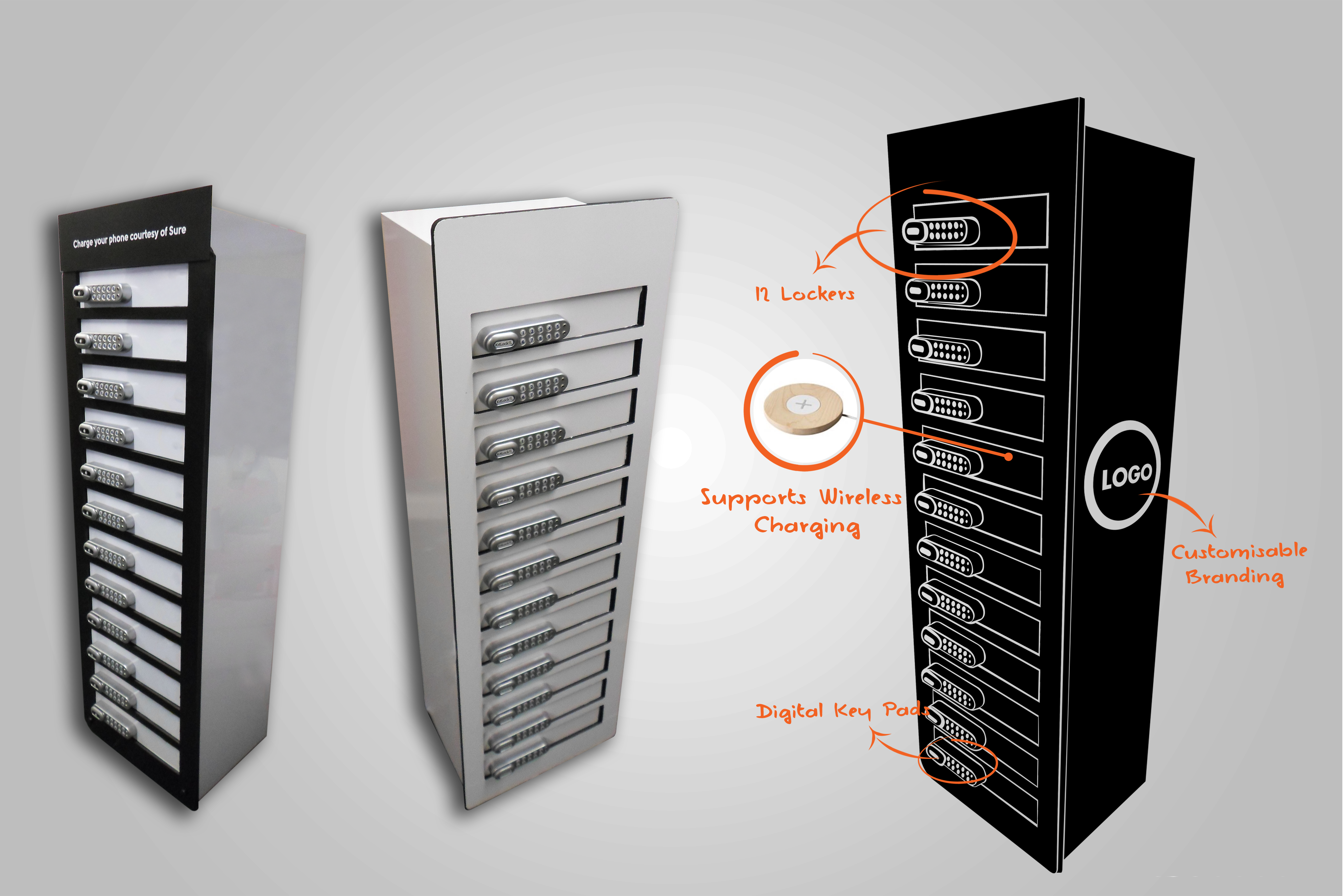
There is no single best configuration for every building. An eight-locker station may suit a reception with steady but modest demand. A 12-locker unit may fit a busier shared space. A 24-locker station may be worth considering where peak demand is higher, such as a large venue or transport environment. The right choice depends on how many users need a locker at the same time, the available floor area and the exact configuration being offered.
This guide explains how charging lockers work, what to compare and what to confirm before purchase or hire. It also looks at three Vischarge options: the LCD-equipped eight-locker configuration, a 12-locker station and a 24-locker station. Product claims below are attributed to Vischarge’s published pages; where the public information is incomplete or inconsistent, the guide says so.
What is a phone charging locker?
A phone charging locker is a unit with separate compartments where users can charge a device while keeping it behind a door secured with a lock. Depending on the model, access may use a key, a user-set PIN, an RFID card or another access method. Charging leads or outlets are located within the compartments.
The important distinction is that the phone is stored as well as powered. An open charging station provides a place to connect a device, but the user may need to stay nearby. A locker gives the user the option to leave it charging, subject to the venue’s instructions and the product’s own security and operating procedures.
A typical self-service visit works like this:
1.The user selects an available compartment.
2.They place their phone inside and connect it to the supplied charging lead or outlet.
3.They secure the door using the configured lock method, such as a personal PIN if the model supports it.
4.They leave the device charging while they continue their visit.
5.They return and use the same authorised access method to retrieve the phone.
Exact steps vary by model. Before opening the station to the public, the operator should confirm the user instructions, how a first-time PIN is set, how an occupied compartment is identified and what staff should do if a user cannot open a door.
Why commercial buildings provide secure phone charging station
Mobile phones are part of everyday work and travel. They are used for access passes, booking details, payment, navigation, communication and two-factor authentication. In a building where people spend more than a few minutes, access to charging can be helpful. The charging locker adds a secure-storage option for those who do not want to leave a phone visible on a desk or connected at a public counter.
The value is practical rather than automatic. A locker does not guarantee longer visits, higher sales or improved satisfaction. Those outcomes depend on the venue, the location, the way the unit is managed and whether the intended users know it is available. A building should decide what problem it wants to solve, then assess whether a charging locker is a good fit.
Where the need may arise
•Offices: Staff, contractors and visitors may need a shared facility in reception, a staff break area or a visitor lounge. A locker can be useful where open charging leads to clutter or where phones should not be left unattended.
•Shopping centres and retail: A charging amenity may help shoppers who are spending time on site. It should be placed where it is visible and straightforward to use, without obstructing circulation or retail operations.
•Hotels: Guests may need power while checking in, waiting for a room or using a shared lounge. The operator should decide whether the unit is for guest use, staff use or both, and make access rules clear.
•Universities and colleges: Students and staff may be on campus for long periods. Libraries, student hubs and reception points are potential locations, but operators should account for peak times and local security procedures.
•Gyms and leisure venues: A customer may want to charge a phone while exercising or using facilities. Reception or a supervised waiting area may be more appropriate than an unsupervised changing area.
•Airports and transport hubs: Passengers may have lengthy dwell times and rely on a phone for travel information, boarding passes or contact with others. Accessibility, passenger flow and clear usage instructions matter.
•Conference and exhibition venues: Delegates can use phones throughout the day for schedules, tickets and communication. Event hire can suit a temporary requirement; a permanent unit may suit venues with a year-round programme.
•Stadiums and arenas: Demand can be concentrated around arrival, interval and departure periods. Capacity should be based on those peaks rather than a daily average.
•Hospitals and healthcare settings: Visitors and staff may appreciate access to power, but placement should respect privacy, clinical operations, infection-control procedures and the facility’s electrical and security policies.
•Coworking spaces: Members and guests may need charging in shared areas. A locker can supplement desk power where users leave the space for meetings or breaks.
•Public buildings and visitor attractions: A clearly labelled station can serve members of the public who are waiting or spending time on site. Staff oversight and incident procedures should be agreed in advance.
Open Phone Charging station or Phone charging locker?
The best format depends on whether the user needs to keep the device in sight, store it securely, or borrow a portable battery. A charging locker is not automatically superior: it takes space and introduces doors, locks and operating procedures. An open station may be preferable where people need continuous access to their phone.
| Option | What it does | May suit | Main trade-off to assess |
| Open charging station | Provides shared charging points or cables without a lockable compartment | Lobbies, cafés, staffed areas and short stops | Users may need to remain with the device; theft risk is not removed by charging alone |
| Individual charging locker | Charges a device inside a separately secured compartment | Waiting areas, offices, campuses, events and other places where users may step away | Requires lock management, clear instructions and a process for failed access |
| Portable power bank | Lets a user take power with them | Temporary deployments or places where people move around | Requires a distribution, charging, return or replacement process |
| Wall-mounted locker | Provides lockable charging in a wall-fixed format where such a product is available | Sites where floor area is constrained and building approval permits fixing | Wall suitability, installation, accessibility and service access need checking |
| Freestanding commercial locker | Stands on the floor and may offer more capacity or display/branding options | Reception areas, venues and larger public spaces | Occupies floor area and needs a safe, visible position with suitable power access |
Vischarge offers both lockable and non-lockable charging stations. The two categories should not be confused: the company’s non-locker LCD page describes a different open-access product, not proof that the secure locker model has the same screen functions or capacity.
What should a commercial buyer look for?
A useful comparison starts with the operating requirement rather than the marketing name. Request a current specification for the exact model and options being quoted. A photograph, broad category page or generic product description is not a substitute for a written configuration.
| Buying area | Questions to resolve | Why it matters |
| Capacity | How many people are likely to need a compartment at the busiest time? | Average daily footfall can hide short periods of concentrated demand. |
| Compartment size | What devices fit, including cases? | A phone with a protective case may need more room than the bare handset. |
| Locking | Is the access method PIN, key, RFID or another option? | The right choice depends on user mix and how staff will manage exceptions. |
| Administrator access | Is there an authorised master/admin function? What does it permit? | Staff need a controlled way to handle forgotten access codes and operational incidents. |
| Charging leads | Which connectors are supplied, how many per compartment and can they be replaced? | Compatibility and wear affect day-to-day usability. |
| Charging output | What output is delivered by each port or lead, and which charging protocols are supported? | A total wattage figure alone does not explain the charging rate available to a single device. |
| Display | Is an LCD included or an option? What content can it show? | Do not assume a screen is touch-enabled or remotely managed unless the specification says so. |
| Construction | What are the materials, dimensions, weight and finish? | Buyers need to plan access, placement, cleaning and delivery. |
| Location | What clear floor area, power access and staff visibility are required? | A good product placed in a poor location can be overlooked or difficult to manage. |
| Branding | What can be customised, and is it included in the price? | Artwork, colour, finish and production requirements vary. |
| Support | What service is included, for how long and with what exclusions? | Downtime, parts and response arrangements matter in a public-facing site. |
| Commercial terms | Is the offer a purchase, rental, hire or lease? What is included? | Compare the complete cost and obligations, not only the headline monthly or purchase figure. |
Commercial-grade versus low-cost consumer equipment
The lowest purchase price may be attractive, but the initial price alone does not show the full cost of ownership. Compare construction, capacity, lock design, charging leads, parts availability, support, lead time, delivery and the effort required to manage the unit.
A business should ask what happens when a lead fails, a door does not open or a screen becomes unavailable. The answer may be in a written service agreement, a warranty, a supplier support arrangement or an internal maintenance plan. Do not assume that a product marketed for commercial use includes a particular repair response, replacement part or service duration unless those terms are in the quote or contract.
There is no need to dismiss every less expensive product. A simpler device may suit a low-use staff room. A high-footfall venue may prefer a more robust configuration or support arrangement. The right decision comes from matching expected use and operational risk to the verified product and service terms.
Choosing a lock: key, PIN or RFID
A lock is part of the user journey and the operator’s incident procedure. A public venue should choose a method that users understand and staff can support.
| Lock type | Potential advantage | Considerations |
| Key | Familiar and independent of a user-created code | Keys can be lost, duplicated or left in the door; operators need a key-control process. |
| Digital PIN | A user can create a temporary access code without receiving a physical key | Users can forget or mistype a PIN; confirm reset and authorised staff-access procedures. |
| RFID card | Can work with an existing staff or venue access card if compatible | Visitor access may require issuing a card; confirm setup, compatibility and what happens when a card is lost. |
Why a master or administrator code matters
A master code can give authorised staff an administrative access route, depending on the system. It may be useful when a user forgets a PIN, a phone is left behind or a unit needs servicing. But the phrase “master code” does not, by itself, define who may use it, whether it opens one compartment or several, whether actions are logged, or how it is reset.
Vischarge’s lockable product page advertises digital keypad locks with a master code and describes that feature as providing administrative access. The page does not publish the step-by-step recovery procedure, access controls or audit details. Ask Vischarge to confirm what “master code” permits on the quoted model and obtain the user/staff instructions before deployment.
A sensible venue process is to verify a claimant where appropriate, restrict staff access to designated people, follow the manufacturer’s authorised procedure, return the device to its owner and record the incident in line with local policy. Do not improvise a lock bypass or publish a master code where members of the public can see it.
Capacity: 8, 12 or 24 lockers?
Choose capacity by estimating simultaneous use, not by counting everyone who enters the building. Many users will not need to charge; some will stay only briefly; others may occupy a compartment for a long time. A small observation exercise in the intended location can be more useful than a broad building population figure.
| Consideration | 8 lockers | 12 lockers | 24 lockers |
| Basic capacity | Up to eight devices at once, if one device is placed in each compartment | Up to twelve devices at once, if one device is placed in each compartment | Up to twenty-four devices at once, if one device is placed in each compartment |
| Likely planning context | Reception, smaller office area, hotel lobby or a defined service point | Shared area with a wider user group or regular moderate peaks | Larger site, event zone or high-footfall location where measured peaks support the capacity |
| Space | Fewer compartments than the larger options; obtain exact dimensions | More capacity than eight; verify footprint and location | Highest capacity of these options; assess physical footprint, visibility and access |
| Vischarge evidence | Its lockable LCD page shows an eight-locker example and describes LCD configurations with eight or more lockers | Its lockable page explicitly lists a 12-locker configuration | Its 12/24 guide discusses 24 units and its event hire page lists 24-locker rental; a complete fixed technical specification is not published in the reviewed pages |
| What to confirm | Exact dimensions, screen configuration, PIN/admin behaviour and cable mix | Exact cable count, connector mix, lock option, dimensions and whether an LCD is included | Exact product drawing, dimensions, charging configuration, locks, screen option, availability and terms |
The first three rows are general capacity comparisons, not a claim that Vischarge supplies every option with identical features. Vischarge’s product pages describe the eight-locker LCD option and a 12-locker configuration. The event-hire page lists rental choices of 12, 24 or 48 lockers. The public site does not provide a full fixed 24-locker specification, so its exact configuration should be confirmed in writing.
A practical way to estimate demand
Use a short, representative period and look at the proposed location during different operating conditions. Note how many people are present, how many appear likely to need charging, how long they stay and whether demand arrives in waves. For an office, the peak may be around lunch or shift changes. For a conference, it may be just before a keynote or during a break. For a shopping centre, the pattern may differ by day and season.
A basic planning calculation is:
Estimated simultaneous capacity = expected users who will charge at the busiest time, adjusted for how long each compartment is occupied.
This is not a precise engineering formula. It is a prompt to collect evidence rather than buy by intuition. If a user charges for 45 minutes and the typical stay is much shorter, turnover may be limited. If the same compartment is occupied for several hours, the unit behaves more like reserved storage than a quick charging point.
Examples:
•An office with 100 employees does not necessarily need 100 compartments. If most people charge at their own desks and only a small number use the shared area at once, a smaller unit might be enough.
•A hotel lobby may have modest average demand but a brief rush at check-in. Observe that peak before selecting capacity.
•A university library could have long dwell times and strong demand during exam periods. A short count outside term time would understate the need.
•A venue with several thousand event visitors may still need lockers only in specific zones. The correct number depends on simultaneous demand and how many stations the venue places around the site.
If evidence is scarce, consider a hire or pilot arrangement where available, then record usage before committing to a permanent installation. Confirm whether the supplier can provide the desired capacity and terms for that trial.
The premium 8-locker LCD charging station
Vischarge’s lockable product page describes a separate LCD-equipped configuration with eight or more individual lockers. It lists an LCD screen, digital keypad locks with a master code or an RFID/work-access-card option, user-generated lock codes and customisable/interchangeable graphics or special finishing. The page includes an image captioned as a screen-equipped, eight-locker unit.
That makes the eight-locker LCD option worth considering when a business wants secure individual compartments alongside a visible branded installation. It may suit an office reception, hotel lobby, conference foyer, corporate waiting space or a smaller customer-facing site where the demand is meaningful but the team wants to assess floor space carefully.
The attraction is the combination rather than capacity alone: individual lockers, a digital access option, an advertised administrator/master-code feature, an LCD and custom graphics. The page describes the product as intended for high-traffic/high-usage environments, but that is Vischarge’s positioning rather than an independently verified durability test.
There are important specification questions to resolve. The public page does not say that the LCD is a touchscreen, publish screen size or resolution, explain how content is uploaded, or state whether content can be changed remotely. It also does not define the exact master-code procedure. The 3–6 cables-per-locker statement is a general feature on the page, but the exact connector mix and charging output for the quoted eight-locker LCD unit should be written into the specification.
Before ordering, ask for the exact external dimensions, internal compartment dimensions, total weight, cable set, charging output, power requirements, display functions and delivery/installation arrangements. Confirm whether any branding offer applies to your order, what artwork files are needed, and whether the service contract is included in the quote. Do not assume that a service or guarantee advertised elsewhere applies to every configuration.
Considering the eight-locker LCD model? Ask Vischarge for a dated specification and quote for the exact screen, lock and cable configuration your building needs.
The 12-locker phone charging station
A 12-locker station provides twelve separate compartments, so it can support more simultaneous users than an eight-locker model. That additional capacity may help in a shared office area, hotel, university common space, event foyer or retail environment where observed demand exceeds what a smaller unit can comfortably serve.
Vischarge’s lockable product page explicitly lists a 12-locker configuration. It describes digital keypad/master-code access or RFID/work-card access, user-generated lock codes and customisable graphics. In the 12-locker section it names Lightning, Type-C/USB-C and Micro USB cables, and an iWatch magnetic cable. The same page gives a 3–4 cable count in that section, while its general feature list says 3–6 cables per locker. Because those statements do not match, the final cable count and mix must be confirmed in the written quote.
The page also states a 250 W fast charger and 230 V input in its 12-locker discussion. It does not specify the output available to each cable, charging protocol, charge-time test or a definitive technical data sheet. Treat those figures as Vischarge’s published statements, not a guarantee that every phone charges at a particular rate.
An LCD is described separately for “8 or more” lockers, but the 12-locker feature list does not establish that every 12-unit includes a screen. If an LCD is important, ask for it as an explicit line item, together with its operation and content-management details. Wireless charging mats are described as an additional extra rather than a standard inclusion.
A 12-locker unit may provide a useful middle ground where the expected peak is higher than eight users but a larger installation would consume unnecessary space or budget. The actual physical difference and price cannot be assessed from capacity labels alone; compare drawings and quotes.
The 24-locker phone charging station
A 24-locker configuration can provide twenty-four individual compartments when fully configured for that capacity. It may be worth assessing for a large office, university, shopping centre, airport, conference venue, exhibition hall, stadium or other public building where peak demand could be concentrated.
Vischarge has a live guide about 12- and 24-unit lockers, and its event-hire page explicitly lists 24-locker rental among the choices. The event page also advertises branded charging options and LCD-screen options generally. However, the public pages reviewed do not provide a complete fixed technical specification for a 24-locker model. Do not assume that a 24-unit has the same lock, cable count, connector mix, display, dimensions or service terms as the described 8- or 12-locker configurations. Request a model-specific technical sheet and quote.
Higher capacity does not remove the need for careful placement. A larger station can be more visible and may be appropriate in a large lobby, but the operator still needs to account for floor area, user flow, power access, accessibility and staff oversight. The intended installation location should be agreed before purchase or hire.
For a temporary exhibition or event, a 24-locker hire option may be easier to evaluate than a permanent installation, if the date and configuration are available. Ask what the rental price includes, who sets up the unit, what support is available if a locker fails and whether branding or screen content requires advance production time. The public event-hire page makes broad support and delivery claims; specific service commitments belong in the quote or agreement.
Where to put a phone charging locker
A locker should be easy to find without interrupting building operations. Common choices include reception, a lobby, a customer-service point, staff facilities, a waiting area, a library, a conference foyer or a hotel reception. The right location depends on who is meant to use the device and who can help when something goes wrong.
Assess these practical factors before confirming the placement:
•Visibility: Users need to notice the station and identify its purpose. Signage should say whether charging is free, paid or restricted, if applicable.
•Access and circulation: Keep routes, doors, queues and emergency exits clear. A station should not create a pinch point.
•Accessibility: Consider reach, approach space, readable instructions and the needs of people who use mobility aids. Ask the supplier for accessible design information where relevant.
•Power: Confirm the unit’s stated electrical requirements and the site’s available supply with the building team. Do not improvise wiring or electrical work; use a qualified professional where building or electrical work is required.
•Supervision: A reception desk or staffed area may simplify questions and forgotten-code incidents. An unstaffed area needs a clear escalation route.
•Lighting and visibility: Users should be able to read instructions and see the keypad. Staff should be able to monitor the area in a manner consistent with privacy policy.
•Cleaning and service access: Allow room to clean around the unit and for authorised maintenance.
•Footfall: Place the station near its intended users, but avoid blocking busy pedestrian flows.
CCTV may help a venue monitor a public area, but it does not replace sound lock design, user guidance or an incident process. Any use of surveillance must follow the organisation’s applicable privacy and security policies.
Can phone charging lockers be branded?
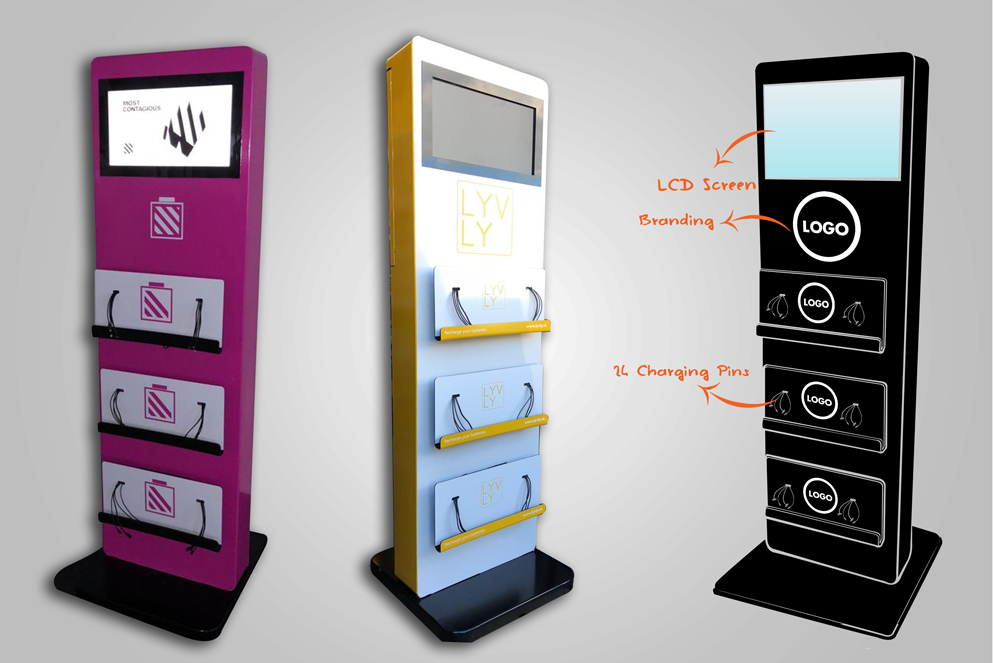
A branded charging locker can carry a company logo, event artwork or venue colours. Depending on the supplier and chosen finish, the branding may appear on the body, doors or display content. A consistent visual design can make the station easier to recognise and can help it look like part of the venue rather than a piece of unlabelled equipment.
Vischarge’s product page describes customisable/interchangeable graphics and special finishing for its lockable LCD configuration. Its event-hire page lists company logos and artwork, sponsor branding, QR codes and promotional content among possible customisation options. Some Vischarge pages promote free branding, but the public information does not define a universal entitlement, artwork limits or exclusions. Treat “free customised branding” as an offer to verify in the quote, not a guaranteed inclusion for every customer or product.
When requesting a branded unit, confirm:
1.Which surfaces can be customised and whether the finish is a printed panel, wrap, decal or another method.
2.The required file format, resolution, colour profile and artwork deadline.
3.Whether proofing and revisions are included.
4.Whether branding is included in the quoted price and what conditions apply.
5.Whether the artwork can be refreshed for future campaigns.
6.Who owns the final artwork and whether any usage restrictions apply.
What an LCD screen can and cannot be assumed to do
An LCD screen can make a charging station more visible and may provide space for instructions, venue information, a welcome message or approved promotional content. At an event, a display might show a sponsor logo or a schedule, if the product and content process support it.
The screen itself does not guarantee advertising revenue, user engagement or remote content control. Those outcomes depend on the audience, the display specification, operating arrangements and any commercial agreement. Buyers should ask whether the screen is static or dynamic, whether staff can change the content, what file types are accepted, whether internet access is needed and whether content is managed locally or remotely.
Vischarge advertises an LCD screen on its lockable 8-or-more-locker configuration. The public product page does not establish a touchscreen, screen dimensions, resolution, connectivity or a content-management platform for the locker model. Do not borrow touchscreen claims from Vischarge’s separate non-locker LCD product page.
Are phone charging lockers secure?
A lockable charging compartment gives a user a more controlled place to store a phone while it charges than an open, unattended surface. It does not provide an absolute guarantee against theft, damage or loss. Security depends on the compartment, lock, physical installation, user behaviour, venue oversight and the procedures used to respond to problems.
A commercial buyer should evaluate both the product and the environment. Ask for details about the lock option, physical construction, how the unit is fixed or stabilised if relevant, and how the operator can recover access. Place the station where it is visible and accessible, provide concise user instructions and agree who is responsible for incidents. A venue should be clear about whether users are responsible for their own devices and whether insurance or terms of use apply.
For PIN lockers, a personal code can avoid issuing a physical key. It also creates a forgotten-code scenario. An administrator/master-code function may help, but the exact capability should be confirmed with the manufacturer. Avoid calling a product “theft-proof” or describing a master code as a formal security standard without evidence.
Charging different phones and devices
Phone models use different connectors and charging standards. A buyer should check the exact cable set and output rather than assume every locker has the same universal lead. USB-C is widely used, Lightning remains relevant for some Apple devices and older phones may use Micro USB. Smartwatches and tablets may require different leads or charging arrangements.
Vischarge’s product page lists Lightning, Type-C and Micro USB for the locker range, and mentions an iWatch magnetic cable in the 12-locker-specific section. It also states that wireless charging mats are an additional extra. The site gives conflicting cable counts, so ask for the exact number and types included in the selected model. Confirm whether the leads can be replaced and what the replacement arrangement costs.
Do not describe a locker as compatible with every phone or guarantee a particular charging speed without model-specific evidence. Device compatibility may depend on cable type, device connector, charging protocol and the condition of the lead.
What happens if a user forgets a PIN?
The venue should have a written, authorised procedure before the first user stores a phone. For a model with administrator access, the process might involve verifying the claimant, restricting access to trained staff, following the manufacturer’s instructions, returning the device and recording the incident. The exact process must come from the manufacturer; it should not be improvised.
Vischarge advertises a master code for administrative access on its lockable models, but the public page does not specify the full recovery procedure or who is authorised to use it. Ask for written instructions covering forgotten PINs, abandoned devices, a failed lock, staff permissions and how the code can be changed. Keep any administrator code secure and out of public-facing instructions.

Buying, renting or leasing
A permanent purchase may suit a building with steady, recurring demand. Hire or rental may be more suitable for a conference, exhibition, festival or temporary campaign. Leasing may be worth considering when the organisation needs a longer-term installation but wants a different payment structure or service arrangement.
| Route | May suit | Points to compare |
| Buy | A permanent amenity with a planned location and ongoing need | Upfront cost, delivery, installation, warranty, support, parts and future replacement |
| Hire/rent | Events, pilots, seasonal peaks or temporary campaigns | Hire duration, transport, setup, collection, support, branding lead time and damage/loss terms |
| Lease | A longer-term installation where monthly payment or an included service model is preferred | Total payments, term, maintenance scope, upgrade options, ownership at end, cancellation and exclusions |
Vischarge promotes purchase, rental/hire and leasing options. Its event-hire page lists 12-, 24- and 48-locker rental choices and says event support, delivery and setup are available. The public pages do not provide a price list or a complete schedule of terms. Ask for a dated quote that itemises the station, branding, delivery, setup, support and any collection or damage charges.
How much does a commercial phone charging locker cost?
There is no verified public price for the specific Vischarge configurations covered in this guide. A quote may depend on locker count, lock type, charging configuration, LCD options, branding, delivery, installation, service and whether the unit is bought, hired or leased.
Compare the complete cost rather than the headline unit price. For a rental, clarify the period and what happens if the event runs longer. For a lease, compare the total payments and end-of-term obligations. For a purchase, request the service and warranty terms, replacement lead costs and any delivery or installation charges.
The best route to an accurate figure is to ask Vischarge for a written quote against a defined requirement: location, dates if temporary, expected number of simultaneous users, desired capacity, lock type, charging cable mix, display needs and artwork. The quote should say which elements are included and which are optional.
Is a phone charging locker worth it?
A charging locker may be worthwhile when people regularly spend time in the building, rely on their phones during their visit and would value a place to charge without leaving a device on an open surface. It can also suit a venue that wants a branded amenity or a shared staff charging point.
An open charging station may be a better fit when users need to keep devices in sight, visits are brief or the venue can provide supervised charging. A locker may be unnecessary where demand is very low or existing charging facilities already meet the need.
A simple decision test is to ask:
•Is there a recurring need, not just an occasional complaint?
•Are users likely to leave the device for long enough to make a locker useful?
•Do they need individual secure storage, or just access to a socket?
•Can staff answer questions and handle access problems?
•Is there a suitable, visible location?
•Does the expected use justify purchase or is a hire/pilot more sensible?
If those answers support the case, ask for a configuration quote and an operating plan before committing.
Best type of phone charging locker by environment
Offices
Start with the number of employees and visitors who may need charging simultaneously, not total headcount. A reception unit can serve visitors, while a staff-area unit can support employees. Consider how long people stay, whether company access cards can be used with RFID and whether a PIN option is easier for guests. An eight-locker LCD configuration may suit a defined reception area; a 12- or 24-locker option needs evidence of higher peak demand and enough space.
Hotels
Decide whether guests will use the locker while checking in, waiting, attending an event or using a lounge. Reception provides staff oversight, but the location should not obstruct the queue. If an LCD is proposed, confirm what it can display and who updates it. Ask about lease or hire terms if the hotel is testing demand before a permanent installation.
Shopping centres
Footfall can be large, but charging demand will vary across the day and by location. A visible public area may serve more users than an isolated corner. Consider how shoppers find the facility, how they get help and whether the station can be monitored. A 24-locker option should be considered only after assessing peak simultaneous use and footprint.
Universities and colleges
Libraries and student hubs often have long dwell times. Measure demand during the busiest term periods, and make sure the lock method works for occasional visitors as well as students. If the lockers are near a staffed service point, confirm staff training and the protocol for a forgotten PIN or abandoned device.
Gyms and leisure venues
Members may want to charge while exercising, but a charging locker should not be confused with a general valuables locker unless the supplier states it is suitable for that purpose. Reception may be a convenient location. Check cleaning access, cable wear and the rules for the devices that can be stored.
Airports and transport hubs
Passengers need clear, fast instructions and accessible placement. Peak demand can occur around departure banks, disruptions or event days. The operator should assess user turnover, service response arrangements, power access and whether the unit may interfere with passenger flow. Confirm exact dimensions and installation responsibility before procurement.
Conference centres and exhibitions
A short-term hire may make sense when demand is tied to a show. A permanent installation may be preferable for venues with frequent events. Ask whether the configuration is available for the event dates, how quickly the unit can be deployed, what happens if a lock fails and how much notice is required for sponsor artwork or screen content. Vischarge lists 24-locker hire and other capacities, but specific terms and availability require a quote.
Stadiums and arenas
Look at peak use during arrival, intervals and departure. A single station may not serve a large site if it is far from visitor routes. Consider several smaller placements versus one larger unit, with attention to security and operating responsibilities. Do not assume that a large event automatically needs the maximum capacity.
Retail stores
A compact unit in customer service or a waiting zone may be more useful than a station hidden at the back of the shop. Staff should know whether charging is free, how users get access and who can help if a compartment will not open. A branded finish may be appropriate, but confirm the artwork cost and specification.
Healthcare facilities
Hospitals and clinics have distinct privacy, hygiene and service requirements. Discuss the proposed location with facilities and clinical teams. Avoid areas where the unit would impede care, infection-control procedures or accessible circulation. Agree how personal property incidents are handled.
Coworking spaces
A coworking operator may use a locker as a shared facility for people moving between desks, meetings and communal areas. Membership cards may be an option if compatible; PIN access may be easier for guests. Capacity should reflect concurrent occupancy, not total registered membership.
Public buildings and visitor attractions
Museums, libraries, civic buildings and attractions often host a varied public audience. Clear language, accessible placement and an easy-to-find staff contact help make a self-service unit workable. A small pilot can reveal whether visitors use the facility and whether a permanent installation is justified.
After-sales support and service terms
For a commercial facility, support is part of the product decision. Ask how the supplier handles faulty cables, failed locks, display issues and replacement parts. Check whether a service agreement covers labour, travel, parts, scheduled maintenance or only remote advice. Confirm the term, exclusions, geographic coverage and response target in writing.
Vischarge’s public pages use several different statements about guarantees and service, but the pages reviewed do not define one consistent contract scope or establish that a 10-year service contract applies to every model. The client brief mentions a free 10-year service proposition, but that specific term was not verified on the current pages checked for this guide. Ask Vischarge to confirm whether it is current, which products and customers qualify, how long it runs and what it covers. Do not market a duration or coverage as guaranteed until the written terms support it.
If free customised branding is offered, verify whether it applies to the selected capacity and purchase route, whether artwork production or only the branding itself is included, and whether any conditions apply. The same principle applies to delivery, installation, maintenance and lifetime cable replacement: rely on the written commercial offer, not a general statement elsewhere on a website.
15 questions to ask before buying
1.How many users are likely to need a compartment at the busiest time?
2.What are the external and internal dimensions of the exact unit?
3.Which phone and other device sizes will fit inside a compartment?
4.Which connector types are included, and how many leads are supplied per locker?
5.What charging output is available to each connector or device?
6.Are individual compartments secured, and which lock type is included?
7.Can users set their own PIN, and what are the steps?
8.Is there an administrator or master-code function on this exact configuration?
9.What should staff do if a user forgets a PIN or a compartment fails?
10.Is an LCD included, and what can it display?
11.Can the unit be customised with our logo or artwork, and is that included?
12.What warranty and service agreement apply, and what are the exclusions?
13.What happens when a cable or lock needs repair or replacement?
14.What are the delivery, installation, power and site-preparation requirements?
15.What is the total cost of ownership or hire for the period we need?
Phone charging locker buyer checklist
•☐ Estimated peak simultaneous demand recorded
•☐ Number of lockers selected against the demand estimate
•☐ External and compartment dimensions confirmed
•☐ Digital PIN, key or RFID access specified
•☐ Administrator access and forgotten-code process documented
•☐ Device/cable compatibility confirmed in writing
•☐ Per-port charging output and relevant protocols confirmed
•☐ Construction, finish and cleaning requirements checked
•☐ LCD specification confirmed, if required
•☐ Branding design, price and terms confirmed
•☐ Service, warranty and exclusions reviewed
•☐ Replacement cables and parts arrangements confirmed
•☐ Delivery, installation and electrical requirements agreed
•☐ Site location, accessibility and user flow assessed
•☐ Future demand and expansion options considered
Frequently asked questions on commercial phone charging lockers
What is a phone charging locker?
It is a charging unit with individual lockable compartments. A user places a device inside, connects it to a charging lead or outlet and secures the compartment using the configured access method.
Are phone charging lockers secure?
They provide individual locked storage while a device charges, but no public locker can guarantee that theft, damage or loss will never occur. Security also depends on the product, location, user instructions and the venue’s incident procedures.
How does a digital PIN charging locker work?
On a user-set PIN model, the user follows the manufacturer’s instructions to assign a code to the compartment, secures the door and later enters the code to retrieve the device. The exact procedure differs by model and should be displayed clearly at the unit.
What happens if I forget my locker PIN?
The venue should follow the manufacturer’s authorised recovery procedure. If the model has an administrator or master-code function, only trained staff should use it after following the venue’s identity and incident checks.
What is a master code on a charging locker?
It is an administrative access feature advertised on some models. Its exact permissions and reset process vary, so buyers should confirm whether it opens a single compartment, how the code is controlled and what happens if it is lost.
How many phone charging lockers does a commercial building need?
Estimate peak simultaneous demand, dwell time, existing charging access and the space available. The total number of employees or daily visitors is not, on its own, a useful capacity figure.
Are phone charging lockers suitable for offices?
Yes, they can be used in offices for employees, contractors or visitors. Choose a capacity and access method based on concurrent demand and where the unit will be supervised.
Can phone charging lockers be branded?
Many commercial suppliers offer branding options. Vischarge describes customisable graphics and branding options; whether branding is free or included depends on the current offer and quotation terms.
Can a phone charging locker have an LCD screen?
Yes, some configurations include an LCD. Vischarge describes an LCD-equipped lockable configuration with eight or more lockers, but the published page does not establish touchscreen, resolution or remote content-management features. Confirm the exact screen specification.
Can charging lockers charge iPhones?
That depends on the supplied cable or charging option and the iPhone model. Vischarge lists Lightning and Type-C/USB-C cable families for its range; confirm the exact configuration and device compatibility before purchase.
Can charging lockers charge Android phones?
Many Android phones use USB-C, while some older devices use Micro USB. Ask for the connector mix and charging output for the exact quoted model rather than relying on a broad “universal” claim.
Are charging lockers suitable for universities?
They may suit libraries, student hubs and other areas where people stay for long periods. Estimate term-time peaks, set out a forgotten-PIN process and confirm capacity and staff responsibilities.
Are phone charging lockers worth buying?
They may be worthwhile if there is recurring demand for secure charging and a suitable location. A hire or pilot can help test demand when the need is temporary or uncertain.
Is it better to buy or rent a charging locker?
Buying may suit a permanent, ongoing need. Rental or hire may suit an event or temporary campaign. Leasing may suit a longer-term site that prefers monthly terms. Compare the full cost, service scope and end-of-term obligations.
How much does a commercial phone charging locker cost?
Price depends on capacity, locking, charging configuration, branding, display options, delivery and service. Vischarge does not publish a price for the specific configurations described here; request a quote for the exact model and terms.
What is the difference between 8, 12 and 24 locker charging stations?
The basic difference is simultaneous capacity: eight, twelve or twenty-four individual compartments. Features, dimensions, locks, screen options and cable configurations may differ, so compare the specification for each model.
Can charging lockers be used in shopping centres?
They can be considered for a visible common area or customer-service zone. Placement should reflect footfall, queueing, accessibility, supervision and the shopping centre’s security procedures.
Can charging lockers be used in hotels?
Yes, a hotel can assess them for reception, a lounge or an event area. Decide whether they are for guest or staff use and ensure instructions and support arrangements are clear.
Will a phone charging locker increase revenue?
It may support a venue amenity or branded activation, but a locker does not guarantee extra revenue, dwell time or sales. Any commercial benefit should be measured against a baseline and the full cost of providing the service.
What should businesses look for when buying charging lockers?
Compare simultaneous capacity, compartment dimensions, lock type, administrator access, charging compatibility, service terms, branding, display features, delivery and total cost. Obtain the exact specification in writing.
Where should a charging locker be installed?
Common locations include reception, a lobby, waiting area, staff space, library, gym reception or conference foyer. Choose a visible position with suitable power access, accessible circulation and an agreed support route.
How long should a commercial charging locker last?
That depends on the unit, usage, maintenance and service conditions. Ask the supplier for the expected service life and written warranty; do not infer a lifespan from “commercial-grade” or “durable” marketing language.
What maintenance does a phone charging locker need?
A venue may need to clean the unit, check leads, monitor locks and report faults. The specific schedule and included service depend on the model and contract, so confirm responsibilities with the supplier.
Do commercial charging lockers come with service agreements?
Some suppliers offer service arrangements, and Vischarge advertises service or support propositions on its public pages. The duration and coverage are not consistently defined there, so confirm eligibility, exclusions and response terms in the written quotation.
A practical procurement process for choosing a locker
The buying decision is easier when the organisation separates its operational need from the specification and then compares like with like. Capacity labels alone do not show whether two stations have the same dimensions, charging leads, screen, locks or service arrangements.
1. Define the intended user and use case
Write down who the unit is for: employees, visitors, customers, students, event delegates or a mixture. Decide whether it will be a free amenity or part of a paid service, whether users can leave a device unattended, and whether they need to stay in the building while charging. If the unit is for employees only, an existing RFID access card may be worth exploring. If the users change throughout the day, a temporary PIN may be easier, provided there is a supported way to handle forgotten codes.
Avoid trying to make one unit solve unrelated problems. A phone charging locker may not be designed for laptops, bags, personal valuables or unattended power banks. If those use cases matter, specify them separately and ask for evidence that the chosen compartment and charging arrangement supports them.
2. Measure demand at the proposed location
Record how many people are present at different times, how long they stay and whether several people arrive together. Where possible, observe a normal busy day and a peak day. A venue that hosts one large exhibition each month has a different demand pattern from a reception that serves a steady trickle of visitors. If the requirement is seasonal, do not size the permanent unit solely around the exceptional day without comparing the cost of a temporary hire.
If the site already has charging points, check whether they are used and what complaints remain. Users may be asking for more outlets, faster charging, secure storage, compatible cables or just better signage. A locker solves the storage-and-charging combination; it may not be the answer to every battery-related complaint.
3. Write the minimum specification before requesting quotes
Provide suppliers with the same information: venue type, indoor location, intended users, expected peak use, desired capacity, preferred lock method, screen requirement, branding need, expected operating period and support expectations. Ask each supplier to quote against that brief and identify any assumptions. This makes it easier to compare the commercial offer without mistaking an optional extra for a standard inclusion.
Ask for the exact product name and configuration on the quotation. For a Vischarge proposal, request the exact locker count; screen option; lock option; administrator access description; cable type and count; charging output; dimensions with units; weight; power requirements; delivery/installation responsibility; and applicable warranty and service terms. If a supplier cannot answer immediately, note the item as pending rather than treating it as included.
4. Compare the written offer, not the headline claim
Read the inclusions and exclusions. Check whether the price includes the product, custom artwork, delivery, setup, training, support, replacement leads and collection or installation. For hire, specify event dates, venue access hours, setup and breakdown windows, support contact and what happens if a unit becomes unavailable. For purchase, ask who owns the maintenance task after the initial service period.
Make a simple decision record for procurement: selected option, alternatives considered, evidence for capacity, unresolved technical questions, service arrangements and the reason for the final choice. This is particularly useful where facilities, IT, procurement, security and marketing teams all have input.
Three example capacity decisions
These examples are planning illustrations, not Vischarge installation recommendations or claims about actual customers. They show why the same building type can justify different capacities.
Example A: a reception serving a small office
Suppose an office has 100 employees, a modest visitor flow and individual desk charging for most staff. The shared charging need may be limited to people waiting for meetings or visitors arriving with a low battery. If observation shows only a handful of likely users at once, an eight-locker model could be sufficient. If an LCD is wanted for a welcome message or approved branding, the team should confirm its intended use and the exact screen functionality rather than selecting it solely for appearance.
Example B: a university library during term
A library may be busy for long stretches, particularly around examinations. The number of potential users is large and devices may remain in a locker for much of a study session. A 12-locker option may be a better starting point than eight if observations show repeated full occupancy, but the operator should also consider whether distributing two smaller units across separate floors would serve users better. A 24-locker unit is not automatically the right choice if students cannot easily find it or if the installation blocks circulation.
Example C: a temporary conference foyer
A conference can experience bursts of demand during registration and breaks. A venue with a permanent low baseline but several large annual events might compare buying with event hire. A 24-locker rental option could be worth asking about if expected simultaneous demand supports it and the supplier can meet the event date. Confirm setup timing, artwork deadlines, cable set, support contact and collection terms before the event; do not rely on an assumption that all services are included in a broad hire description.
In each case, count likely simultaneous users, consider how long they occupy a compartment and place the unit where it can be used without creating a queue or obstruction. If there is no reliable demand data, a pilot or short hire can provide evidence for the next procurement cycle.
The total cost of ownership: costs beyond the unit
The total cost is not just the purchase price. For a permanent installation, the organisation may need to account for delivery, site preparation, installation, branding, staff time, maintenance, replacement parts and eventual refurbishment or disposal. For hire, the relevant comparison is the cost for the required dates, including transport, setup, support, artwork, extensions and any damage or loss provisions. For a lease, compare the full payments over the term and the responsibilities at the end.
| Cost or responsibility | Questions to ask |
| Equipment | Does the quote identify the exact locker count and configuration? |
| Branding | Is artwork included, and are design, proofing or refreshes charged separately? |
| Delivery | Is delivery to the building included? Are there access, stairs, lift or timed-slot charges? |
| Installation | Is the unit freestanding or does it require fixing? Who checks the site and completes any work? |
| Staff time | Who explains the user process and responds to a forgotten PIN? |
| Consumables and parts | What is the price and lead time for replacement cables, locks or other parts? |
| Service | What is covered, for what duration, and what is excluded? |
| Downtime | What is the response process if a station or compartment is unavailable? |
| End of term | For rental or lease, who removes the unit and what condition must it be in? |
These questions do not imply that every item is an extra charge. They help identify which responsibilities the supplier includes and which remain with the building operator. Request an itemised quote and service terms so finance and facilities teams compare the same scope.
Preparing the operating procedure before launch
A locker should not be treated as self-explanatory equipment simply because it has a keypad. Before opening it to users, assign an operational owner and agree what happens during normal use and exceptions.
At a minimum, decide who checks that the unit is clean and available, how the venue reports a faulty lead or door, where users find help, and who is authorised to use administrator access. If a user reports a forgotten PIN, staff should follow the supplier’s written procedure and the venue’s identity-check and incident-reporting rules. Establish a process for devices left behind after closing time; do not leave staff to decide ad hoc whether to open a compartment.
Instructions should be brief and placed where users can see them. They should explain how to identify an available compartment, connect the device, set or use the lock, retrieve the phone and contact staff if access fails. Do not display an administrator code or include sensitive recovery details on public signage. If users must accept terms or remain nearby, communicate that before they store a device.
After launch, record basic operational information: occupancy checks, common user questions, failed access reports, damaged leads, service calls and whether the unit is often full or mostly unused. Review those observations with facilities and procurement teams after an agreed period. The resulting evidence can guide whether the site should keep the same capacity, change the location or add another unit.
Free amenity, paid service or member benefit?
The operator should decide how users will access the service before ordering. A free amenity is straightforward to explain, but the organisation still needs a policy for fair use, abandoned devices and limited availability. A paid service may help recover operating costs, but payment adds steps to the user journey and may require payment infrastructure, refunds, receipts or customer support. A members-only arrangement may suit a staff facility or coworking space, although visitors will need to know where else they can charge.
The product specification alone does not settle this question. The venue should consider the audience, whether the facility has an existing policy on unattended property, who handles complaints and what wording will appear on signs or the screen. State any fee, time limit, restriction or user responsibility before the device is stored. Do not imply a phone is insured or guaranteed safe unless the contract or venue policy actually says so.
If branding or sponsorship is part of the business case, separate the value of that opportunity from the purchase decision. An LCD or branded wrap can provide a place for approved messages, but it does not guarantee that a sponsor will pay, that users will notice the message or that a campaign will produce a measurable return. Discuss who supplies content, who approves it, how often it can change and whether any commercial rights are included. Keep the charger useful even when no campaign is running.
How to assess a pilot or first year
Set a few simple measures before deployment. The aim is not to collect more data than necessary. It is to answer whether the facility is used, works reliably and is worth its cost.
Possible measures include the number of occupied compartments during sample checks, how often every locker is in use, reported access problems, faults per month, time taken to restore a failed compartment, the number of user enquiries and basic feedback from staff or visitors. A venue may also note the hours or events when demand is highest. Do not collect personal device details or identify individual users unless there is a clear, lawful operational need and an approved process.
Choose an initial review date, such as several weeks after launch, and a later review after a representative busy period. Compare the results with the baseline: Was charging already available? How many users asked for help? Was the station visible? Did a change of position improve use? Did the chosen locker count leave unmet demand or sit mostly empty? If the station is hired for an event, collect brief post-event feedback from the organiser while details are fresh.
Use the findings to decide whether to keep the same configuration, adjust signage, move the unit or seek a different capacity at renewal. Low use does not automatically mean the product failed: the location may be wrong, the sign unclear, or the audience unaware of the service. Conversely, frequent use does not prove that the largest unit is needed; queues and occupancy observations are more informative than a few anecdotal comments.
Final verdict: choosing the right phone charging locker
Choose an eight-locker option when measured demand fits that capacity and the location benefits from a smaller number of secure compartments. Consider an LCD configuration if visible instructions, branding or approved venue content matter, but confirm the screen’s actual functions and costs.
Consider twelve lockers when a shared area has a higher expected peak and the footprint remains suitable. Verify the exact lock choice, connector mix, cable count, charging output and whether the display is included.
Consider twenty-four lockers when observations support a larger simultaneous capacity, especially in a venue with concentrated event or passenger demand. Request a model-specific technical sheet: the public Vischarge pages reviewed do not define a complete fixed 24-locker specification, although the company lists 24-locker event hire.
The best choice depends on real user demand, dwell time, available floor space, budget, access needs, branding requirements and service terms. If you are considering a branded, secure charging locker for a commercial building, contact Vischarge to discuss the requirements for your site and ask for an exact written configuration and quote.
Visit Vischarge or use the contact page to discuss purchase, hire or leasing options.